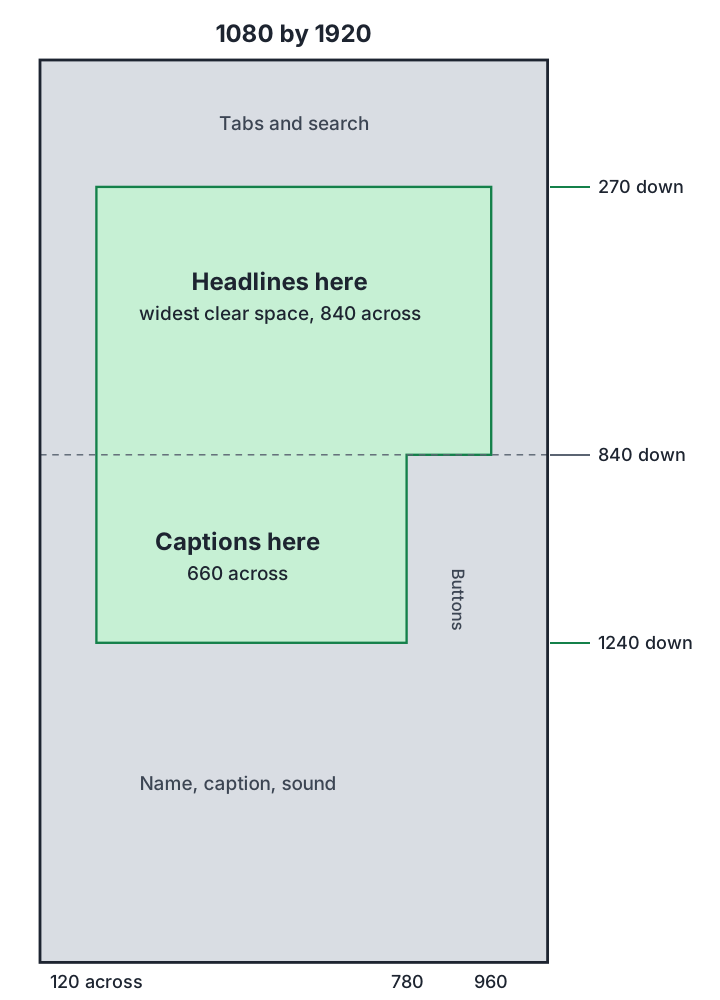
On a 1080 by 1920 video, keep words and faces between 270 and 1240 pixels down, and between 120 and 960 across. Below the 840 mark, stop at 780 across, because TikTok’s buttons start there. That box clears the standard layouts of TikTok, Reels and Shorts, and it’s only about 36% of the frame. A long TikTok caption can cover more. Meta and Google publish their numbers. TikTok publishes template files, so its pixels come from people who measured them.
Why this catches people out
You edit on a clean screen, and it looks fine. Then it goes live and the app lays its own furniture on top: your name, the caption, the sound, a column of buttons, tabs across the top. Your headline ends up under the caption, and your price under the like button. It’s a quick thing to fix once you know where the furniture is. You’d think everyone would publish that clearly. They don’t.
The numbers, and how far to trust them
All in pixels from each edge, on a 1080 by 1920 frame. Percentages are from the source, and the pixels are our conversion.
| Platform | Top | Bottom | Left | Right | Where the number comes from |
|---|---|---|---|---|---|
| TikTok | 240 | 660, or 1014 with a long caption | 120 | 120, and 300 from 840 down | Measured by AdMakeAI and Socialync from the template TikTok links on its in-feed ad page. We didn’t open the template ourselves, and other sites quote smaller numbers |
| Instagram Reels | 269 (14%) | 672 (35%) | 65 (6%) | 65 (6%) | Meta’s ads guide, official, written for ads |
| Facebook Reels | 269 | 672 | 65 | 65 | Our assumption. We found no separate Facebook figure, so we use Instagram’s |
| YouTube Shorts | 192 (10%) | 480 (25%) | Not given | 108 (10%) | Google’s Shorts ads page, official. It gives no number for the left |
| All of the above | 270 | 680 | 120 | 120, and 300 from 840 down | Our math: the largest standard number on each side, rounded up. It leaves out the long TikTok caption |
Where to put things
- Your headline goes in the upper part of the box, between 270 and 840 down. TikTok’s buttons don’t start until 840, so this is the widest clear space you’ll get: 840 pixels across.
- On-screen captions go lower, between 840 and 1240, in a narrower column ending at 780 across. Most text overlaps in real videos happen here.
- Faces and products go in the middle. If a face is the point of the shot, don’t let the lower third of the frame cut through it.
- Logos don’t belong in a corner. All four corners are at risk. On TikTok, if an app posts for you, it shouldn’t add one anyway.
- Backgrounds can run edge to edge. These limits are for things that have to be read. Nothing is wrong with a picture carrying on behind the buttons.
Things most charts leave out
- The bottom edge moves. On TikTok, a longer caption pushes the covered area up: AdMakeAI reads about 1014 pixels by eye from TikTok’s 2021 template, against 660. Our box doesn’t go that far, so keep your own caption short, or keep your words higher.
- These numbers are mostly for ads. Ads add a button, and regular posts don’t. AdMakeAI notes that TikTok publishes no safe zone for regular posts and suggests using the same one, and that’s what we do. It’s the safer mistake.
- Screens differ. TikTok’s template marks its side margins as possibly cropped depending on the device, according to AdMakeAI. A newer phone may show more than an older one.
- Sources disagree. Some sites quote TikTok’s top as 130 to 220 and its bottom as 250 to 340, and one puts Shorts’ right side at about 201 against Google’s 108. For TikTok we use the larger numbers, which lose a little room and avoid a covered word. For Shorts we use Google’s own figure, so stop at about 880 across if you’d rather be safe against the other one.
- Apps change these whenever they redesign, so look again every few months.
Other shapes
We found no platform figures for square, 4:5 or wide video in feeds. We leave about 5% on each side, which is the graphics-safe margin in the broadcast standard EBU R95. That’s 54 pixels on a 1080 by 1080 frame. On 1920 by 1080, we add a little more at the bottom for player controls, and that part is our guess.
How to check your own video
- Before you edit, set a guide in your editor at 270, 840 and 1240 down, and at 120, 780 and 960 across. Most editors let you add guides or a template image.
- Or lay a checker over the finished video. At least eight free ones exist, and ours is one more. Several run right in the browser.
- Then look on a real phone. Post it privately or send it to yourself, and watch it in the actual app. It’s the only test that shows you the real thing.
- Check the first frame again. It’s the one people judge you on, and it also becomes the cover in many feeds.
Lou by Luven AI, the video tool we’re building, uses this same box when a video is headed to several platforms, and a tighter one per platform otherwise. Lou isn’t open yet, and we haven’t checked these numbers on real accounts, so treat them as a careful starting point. We’ll date every change.
Sources, read 3 and 4 Nov 2026
How we write these: with AI help, from the sources we link, with dates. Counts marked as ours were made by an AI reader with no second check. If something’s wrong, email everest@luven.ai and we’ll fix it and say so.
